Sometimes, small details can make a big difference in your tracking accuracy.
One of those details is a single setting in your Consent Mode setup: url_passthrough.
This short guide will show you why it matters, how to test it, and how to fix it if it’s missing.
What is url_passthrough and why it matters
When users reject cookies, Google Analytics and Google Ads lose the ability to store click IDs in browser cookies. To maintain attribution in this scenario, Google appends click information to the page URL parameters like this:
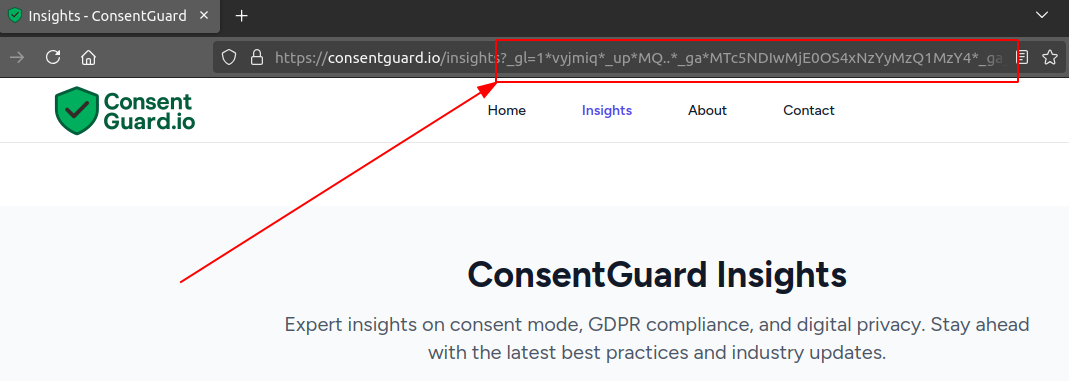
These look messy, but they’re essential. If these parameters are missing, Google cannot correctly link ad clicks with conversions for users who denied consent. You're all thinking that Google does conversion modeling, right? Well, yes, but it will be far less accurate without these parameters.
How to test if yours is active
You can run a free check right here on ConsentGuard.
But you can also do a quick check manually in just a few minutes:
- Open your website in a new incognito window.
- Add
?gclid=testto the URL. For example:https://consentguard.io/?gclid=test - Wait for your cookie consent popup to appear.
- Decline all cookies, then click on any page.
Now check the URL:
- If it contains additional parameters (something starting with
_gl=), it’s good.- Give yourself a pat on the back! Your
url_passthroughsetting is active, and Google can track ad clicks even when users reject cookies. - Don't just close this page. Read below, there might be another catch.
- Give yourself a pat on the back! Your
- If it stays clean, it’s bad — your
url_passthroughsetting is not active.- This means that when users reject cookies, Google will have no way to connect ad clicks with conversions.
Note: there could also be a problem for users who ignore your cookie banner. So you can make an additional check: open your website again in incognito mode, but this time don't click on your cookie banner. Try to click on another link on the page.
-
If you cannot click anywhere, then your CMP is blocking all clicks until the user interacts with the cookie banner. This is a good thing, because it forces users to make a choice.
-
If you can click, then check the URL. If it contains the
_glparameter, then you are good to go. If not, you should add the url_passthrough parameter.
How to fix it
If you’re using Google Tag Manager
- Open the tag for your CMP (e.g. CookieBot, CookieScript, CookieYes, OneTrust, etc.).
- Look for the
url_passthroughcheckbox. It might also appear as “Pass ad click information through URLs.”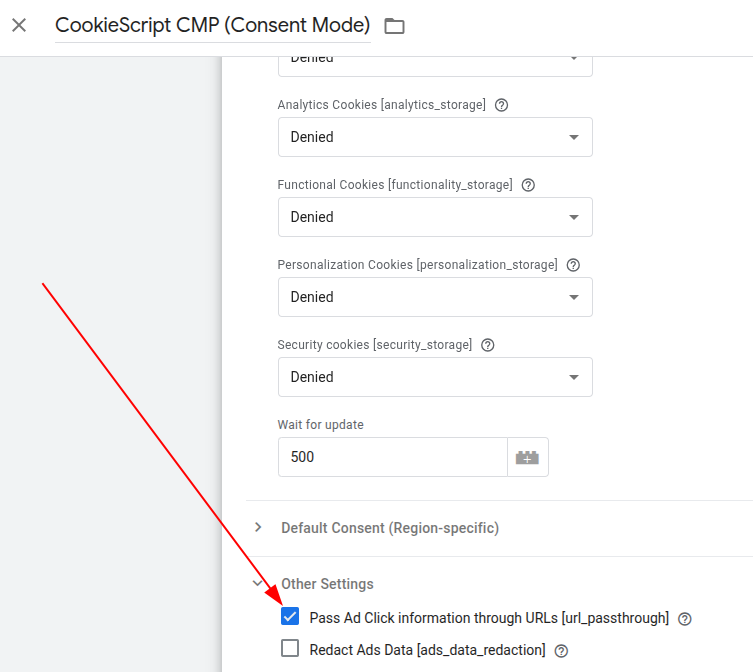
- Check the box, publish the new version, but make sure you don’t have other pending changes.
If you’re using a plugin or app
Search the plugin or app configuration for url_passthrough and enable it if available.
If a developer implemented your Consent Mode manually
Ask them to add this line before sending the first consent command:
gtag('set', 'url_passthrough', true);
How to verify the fix
Once you’ve made the change, repeat the same test as before.
If the URL now includes the _gl parameter, your setup is working correctly.
You can also let ConsentGuard test it for you: 👉 https://consentguard.io/free-check
After running the check, look for URL_PASSTHROUGH_MISSING in your report. If the fix is not implemented, this is how it should show in your report:
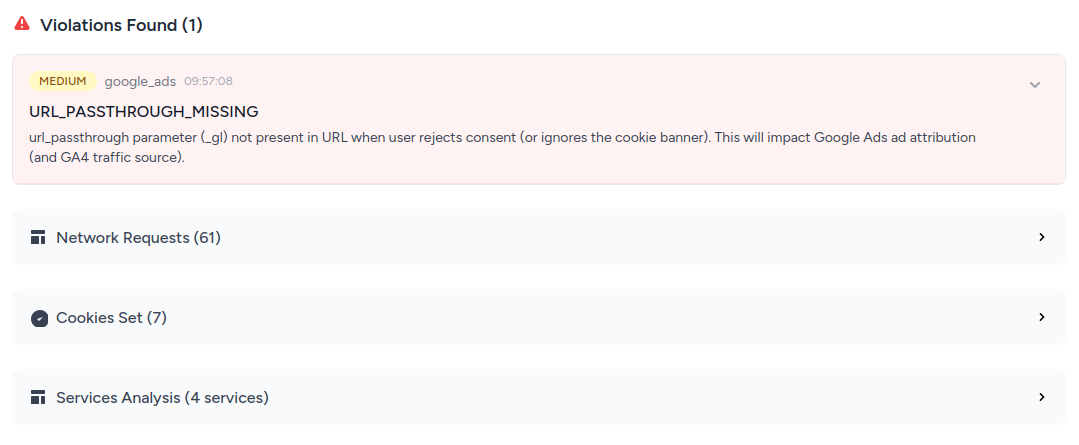
If it doesn’t show up, you’re all set — you’ve just improved your attribution for users who reject cookies (or who ignore your consent banner).
Keep your Consent Mode setup healthy
Your Consent Mode setup is not a one-time task. This is why we built ConsentGuard — to help you automatically monitor your website and catch issues before they escalate.
For example you might change your cookie consent provider, or your developer might update the code and things may break. The url_passthrough parameter is only one of the many things that can go wrong.
Our pricing starts at €3.99/month. One day of lost conversions can easily cost you more than that, so it’s a no-brainer to keep your Consent Mode healthy. Check our pricing page for more details and sign up.
Final thoughts
This parameter is often overlooked, yet it plays a key role in preserving ad attribution and maintaining accurate data when consent is denied. It takes less than a minute to test, and fixing it could recover a measurable portion of lost conversions.
Small change. Big impact.