[!NOTE] This article covers manual gtag.js implementations. If you are using Google Tag Manager (GTM), check out our GTM-specific troubleshooting guide.
If you’ve skipped the GTM route and implemented Google Consent Mode v2 manually using gtag.js, you have more control, but also more ways for things to go wrong.
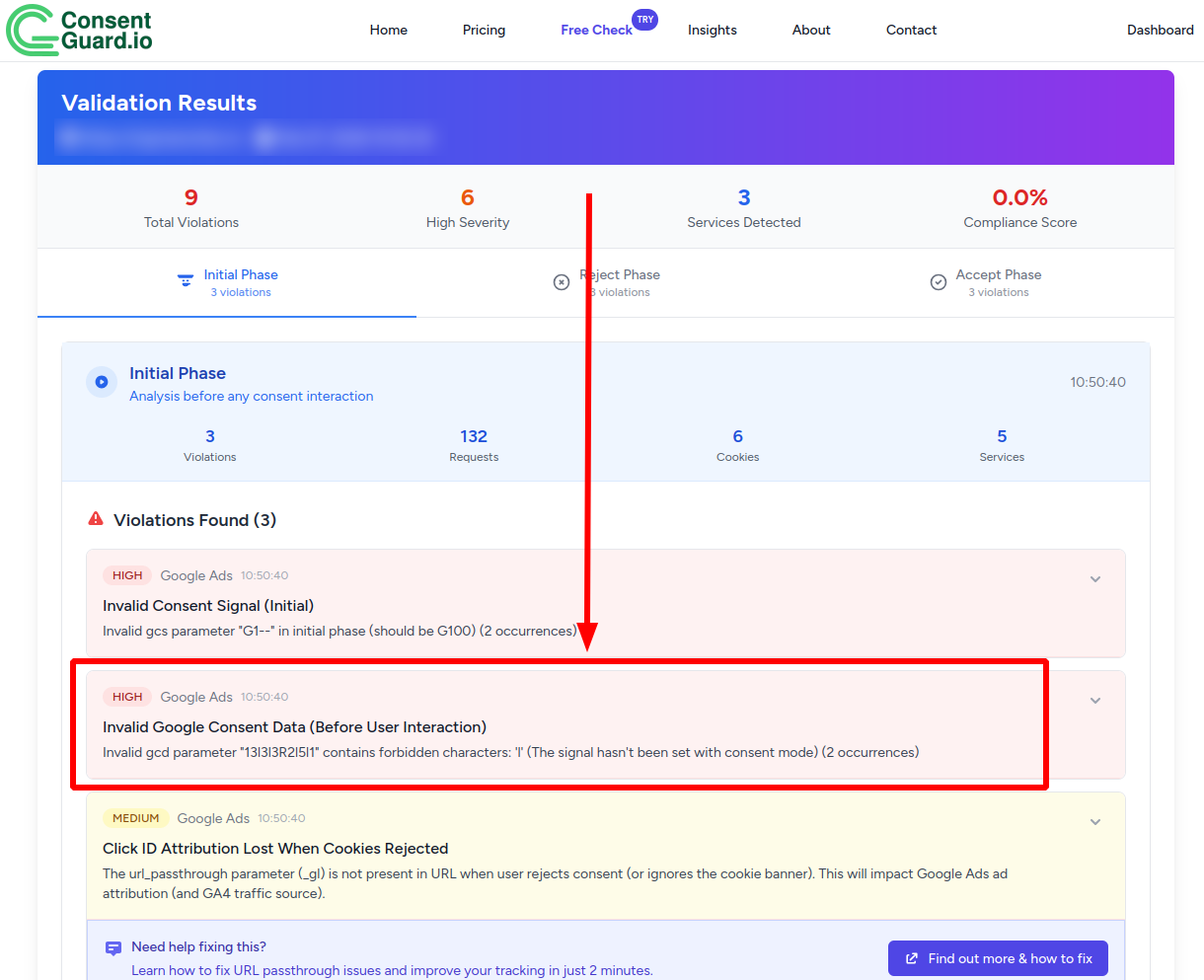
One of the most common technical "red flags" we see at ConsentGuard is the lowercase "l" appearing in the gcd parameter.
What is 'l' Telling You?
In a GCD string (e.g., &gcd=13l3l3R2l5l1), the character "l" stands for "unset".
It means that while your tracking tags are firing, Google hasn't received a default or update command for that specific consent signal (like analytics_storage or ad_user_data).
For developers, this usually points to a race condition or a wrong order of execution in your script tags.
3 Reasons Why Your gtag implementation is sending 'l'
1. The 'default' Command is Missing
The most obvious reason is that you simply haven't defined the default consent state. In v2, you must include all four signals. If you only define ad_storage and analytics_storage, the others (ad_user_data and ad_personalization) will default to "l".
2. The Execution Order is Wrong
This is the "Silent Killer" of Consent Mode. The gtag('consent', 'default', ...) command must be executed before gtag('js', new Date()) and before any gtag('config', ...) calls.
If your code looks like this, it’s broken:
<!-- WRONG ORDER -->

<script async src="https://www.googletagmanager.com/gtag/js?id=AW-123456789"></script>

<script>
  window.dataLayer = window.dataLayer || [];
  function gtag(){dataLayer.push(arguments);}
  gtag('js', new Date());
  gtag('config', 'AW-123456789');

  // This is too late!
  gtag('consent', 'default', {
    'ad_storage': 'denied',
    'analytics_storage': 'denied'
  });
</script>
3. Async Loading Issues
If you are loading your consent default settings via an external script or a CMP that loads asynchronously, the browser might execute your main gtag config before the consent defaults are loaded. Google then sees the tags firing without a consent state and marks them as "l".
How to Fix It
The fix is straightforward: Put your consent default command at the very top of your <head>, before any other tracking scripts.
Here is the correct template for a manual Consent Mode v2 implementation:
<script>
  // 1. Initialize dataLayer
  window.dataLayer = window.dataLayer || [];
  function gtag(){dataLayer.push(arguments);}

  // 2. Set DEFAULT consent (Must be before gtag('js', ...))
  gtag('consent', 'default', {
    'ad_storage': 'denied',
    'analytics_storage': 'denied',
    'ad_user_data': 'denied',
    'ad_personalization': 'denied',
    'wait_for_update': 2000 // Instructs Google tags to wait up to 2 seconds for a consent update
  });

  // 3. Load the library
  gtag('js', new Date());

  // 4. Configure your Google Ads tag
  gtag('config', 'AW-123456789');
</script>

<!-- 5. Now load the external script with your Google Ads ID -->
<script async src="https://www.googletagmanager.com/gtag/js?id=AW-123456789"></script>
[!TIP] The
wait_for_updateparameter is a "safety buffer". It tells the Google script to pause for up to 2000ms before sending any data. If your CMP sends theupdatecommand before that time is up, the data is sent immediately with the correct consent status.
Verifying the Fix
You can verify this in your browser console. Filter for gcd in the Network tab and look for the parameter. You want to see letters like p, r, q, or m - avoid the l.
Alternatively, let ConsentGuard do the heavy lifting. Our scanner detects "l" signals automatically and alerts you precisely which signals are missing.
Conclusion
In manual implementations, the "l" signal is almost always a sign that your default command is firing too late or is incomplete. By ensuring that your default state is set immediately - and includes all v2 signals - you'll ensure Google's modeling works as intended and your attribution stays accurate.