If your ConsentGuard report shows Forbidden Cookies Set Before User Consent or Forbidden Cookies Set After User Rejected, it means tracking cookies were written to the browser at a moment when they should not have been. Common offenders include _ga, _gcl_au, FPID, FPAU, FPGCLAW, wbraid (Google) and MUID, _uetsid, _uetvid, _clck, _clsk (Microsoft).
Under GDPR and the ePrivacy Directive, non-essential cookies require prior consent. Storing them before the visitor has accepted, or after they have rejected, is a compliance issue regardless of whether your tracking platform sends data afterwards.
Why this article assumes Advanced Mode
Google offers two implementations of Consent Mode v2. Basic Mode blocks every Google tag from loading until the visitor accepts, so no requests, pings or cookies leave the browser; the forbidden-cookies violation effectively cannot fire under Basic. Advanced Mode loads the Google tag immediately, sends anonymous "cookieless pings" while consent is denied, and is supposed to keep _ga, _gcl_au, FPID and other persistent identifiers out of the browser until the visitor grants consent.
If ConsentGuard is flagging forbidden cookies, you almost certainly have Advanced Mode running and the default-denied state is not in place when the tag initialises. The rest of this article is about getting that timing right.
First check: whose cookie is it?
Before assuming the fix is on your side, open the violation in ConsentGuard and look at the Domain column of the cookie that triggered it. The domain tells you who actually wrote the cookie, and the answer changes what you can do about it.
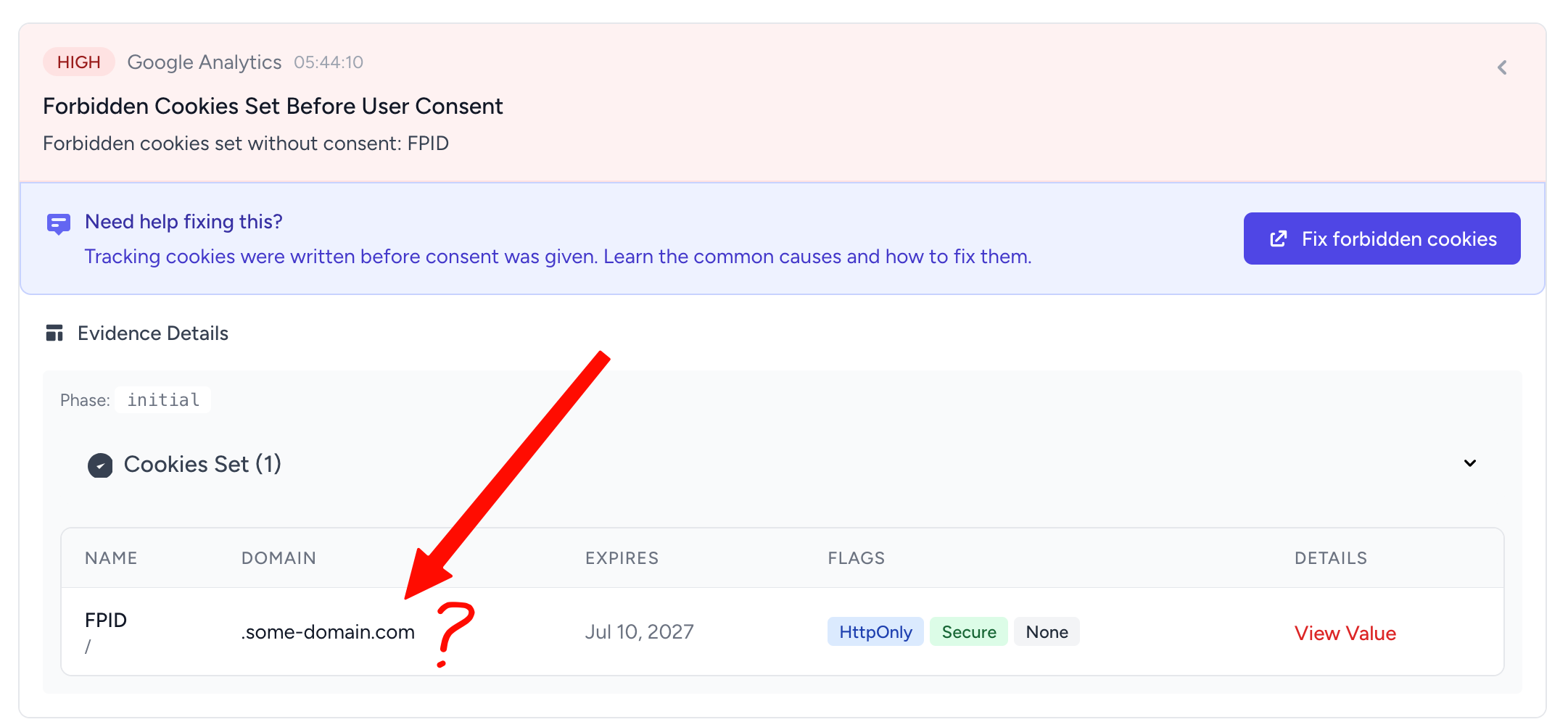
If the domain is your own site (e.g., yoursite.com or .yoursite.com), the cookie was written by a script running in your first-party context: your GA4 tag, your Ads tag, your CMP, or a duplicate snippet someone pasted into the theme. The fixes in the rest of this article apply.
If the domain is a third-party vendor's own domain (e.g., a retargeting or ad-tech vendor such as Criteo, RTBHouse or Biano, setting cookies on their own .criteo.com, .rtbhouse.com or .biano.com), you cannot change the cookie behaviour directly. You have two options:
- Contact the vendor and ask them how to gate their script on consent. Most reputable vendors expose a configuration flag or an API for exactly this.
- Block their script in the initial phase through your tag manager or CMP. In GTM, that means moving the vendor tag onto a trigger that fires only after consent is granted. In a CMP like Cookiebot or OneTrust, that means categorising the vendor script under a non-essential consent category so the CMP blocks it until the user accepts.
From here on, the article assumes the cookie sits on your own domain.
What is happening
In Advanced Mode, the Google tag inspects the consent state the moment it runs. If gtag('consent', 'default', ...) has already executed and declared every signal denied, the tag stays in cookieless mode and writes nothing. If the default has not been set yet by the time the tag initialises, the tag has no instruction to hold back and writes its identifiers immediately, which is exactly what the validator catches.
That race condition is the most common cause, but not the only one. The four scenarios worth checking:
- The default consent state is being set after the tag has already initialised. The Google tag inspects the consent state the moment it runs. If
gtag('consent', 'default', ...)has not executed yet, the tag treats consent as unset and writes its identifiers anyway. - There is no default consent command at all. Some sites only send an
updateafter the user clicks Accept, with nothing earlier. Without a default, the tag has no instruction to hold back. - A second tracking script is bypassing your CMP. A duplicate GA4 snippet pasted into the theme, an analytics plugin, or a marketing tool loaded by another script can write cookies before your CMP has had a chance to set defaults.
- The CMP itself is loaded too late. If the consent script is loaded with
defer, placed near the bottom of the page, or fetched from a slow third-party domain, the Google tag can fire first.
How to fix it (manual gtag.js)
The default consent command must be the first Google-related code on the page, before the gtag.js library is loaded and before any config calls. The full template:
<script>
  window.dataLayer = window.dataLayer || [];
  function gtag(){dataLayer.push(arguments);}

  gtag('consent', 'default', {
    'ad_storage': 'denied',
    'analytics_storage': 'denied',
    'ad_user_data': 'denied',
    'ad_personalization': 'denied',
    'wait_for_update': 2000
  });

  gtag('js', new Date());
  gtag('config', 'G-XXXXXXX');
</script>
<script async src="https://www.googletagmanager.com/gtag/js?id=G-XXXXXXX"></script>
The order matters. gtag('consent', 'default', ...) has to execute synchronously, in the document <head>, before the external gtag.js script begins running. wait_for_update gives your CMP up to two seconds to send the user's actual choice before any pings are sent.
We have a more detailed walkthrough in the manual gtag fix guide.
How to fix it (Google Tag Manager)
In GTM, the fix is to make sure the consent default tag fires on the Consent Initialization - All Pages trigger, not on Page View or All Pages. Anything that depends on consent (GA4, Google Ads, Floodlight, Microsoft UET) should fire on triggers that run after Consent Initialization.
If you use a CMP template from the GTM gallery (Cookiebot, OneTrust, CookieYes, Iubenda, etc.), check that the template is up to date and that its built-in default consent is enabled. We cover the GTM-specific path in the GTM consent mode fix guide.
How to fix it (Microsoft UET)
Microsoft's UET tag has its own consent mode signal (adsConsent). If you see MUID, _uetsid, _uetvid, _clck or _clsk set before consent, the same pattern applies: the UET script is initialising before the consent default has been declared.
In GTM, set the UET consent default through the same Consent Initialization trigger. If you embed UET manually, the uetq push for default consent must run before the UET library loads.
Check for duplicate trackers
A common surprise: the cookies are being written by a script you forgot about. Before assuming the CMP is at fault, check the page source for stray tracking snippets.
[!TIP] View the page source (
Cmd/Ctrl + U) and search forgtag(,_ga,dataLayer,fbq(,uetqand any plugin-specific snippets. If a second copy of GA4 or Google Ads is hard-coded into the template while a CMP-managed copy lives in GTM, the hard-coded one will fire unconditionally and write cookies regardless of consent.
Verify the fix
After deploying the change, reload the page in an incognito window and, before clicking anything on the banner, open DevTools and check Application → Cookies. The forbidden names should not appear.
You can re-run the page through ConsentGuard to confirm. The Forbidden Cookies Set Before User Consent violation should disappear from the report, and the cookie list in the Initial phase should only contain essential cookies (session, CSRF, the CMP's own consent record).